
Understand a deal assessment
An assessment explains what the available comparisons suggest about a listing and where the evidence falls short.
Read the result first
Choose View deal on a saved result. Read the asking-price warning and the research status before using any calculation. You do not have to enter a resale estimate just to inspect the listing.
When research is available, the assessment may show comparisons, an estimated resale price, estimated profit, Max buy and FlipScore when the evidence supports them. This deal has no estimate yet means no automatic valuation is available; check price, condition and pickup on the original listing.
What if there is no estimate?
When FlipFirst can’t support an estimate, often because there aren’t enough similar listings, the deal shows Closest comparisons or says it has no estimate yet. No estimate doesn’t mean the item is worth nothing. Check the model, version, condition and what’s included on the original listing.
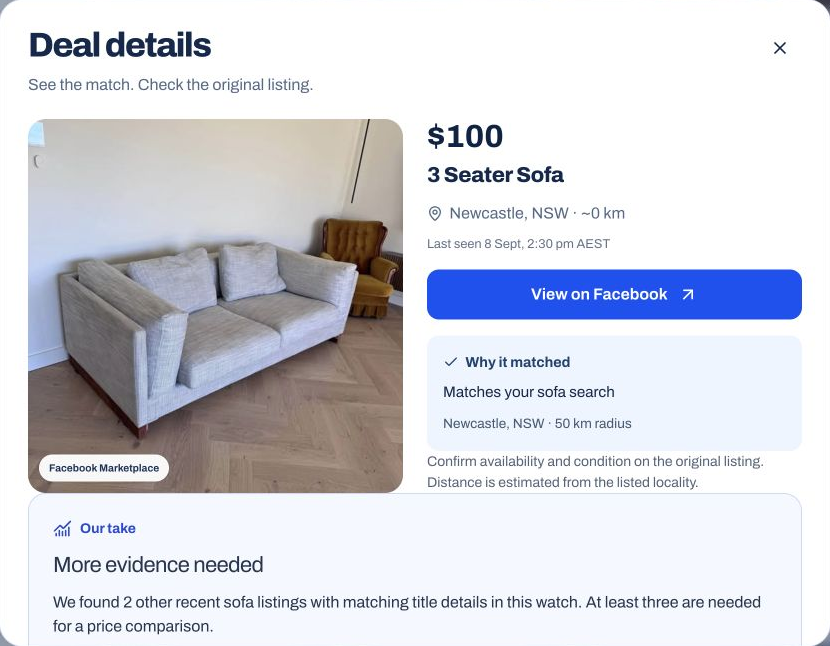
For comparisons from this watch’s saved listings, FlipFirst needs at least three similar recent listings before it shows an asking-price range. You may still be able to open single comparisons. A count on its own doesn’t show that the listings are alike or what the item will sell for.
The screenshot below is from an earlier version. Follow what your deal shows.
Understand the terms
- Estimated resale
- A provisional estimate based on the available comparisons. Check whether those observations are asking prices or evidence of completed sales.
- Estimated profit
- An estimate after purchase price and included costs. Missing transport, cleaning, repairs or selling fees can make it too optimistic.
- Max buy
- The most you can pay and still reach your profit target at the low resale estimate, after the costs you entered. It changes when those numbers change.
- FlipScore
- A score from 10 to 100 based on how much of the low resale estimate you would keep as profit. Scores from asking prices stop at 60. Your own resale estimate does not get a score. It is not a chance of making money or a measure of selling speed.
Check the assumptions before buying
Compare the item, condition and location behind the estimate with the listing in front of you. Read asking price versus resale value for the evidence differences, and the flipping costs people forget before relying on a margin.
Reliable comparison coverage and calibration are still being verified. See product status for the current limits.
Adjust only what you know
Open Adjust your estimate if you want to enter your own resale assumption, known costs or profit target. These fields are optional and save automatically for that deal. Wait for Saved to your account. If saving fails, use Retry; if another saved version conflicts, use Reload saved calculation before continuing.
An empty cost field is not confirmation that collection, repairs or fees cost nothing. This is a buying estimate, not an inventory ledger or a record of money you made. When research is waiting or unavailable, follow the displayed recovery action; a refresh cooldown limits when new research can be requested.
Message the seller
The Message the seller panel writes a message for you to copy and send yourself. Choose Ask if it’s still available or Make an offer, then use Show message to read it or Save message to keep it. It is offered for deals with a FlipScore of 60 or more. You can save up to eight messages a day; showing one does not count.
Saved · not sent means exactly that. FlipFirst does not contact sellers or buy items for you. Review the item and text yourself before sending anything on the original marketplace.