
Create your first watch
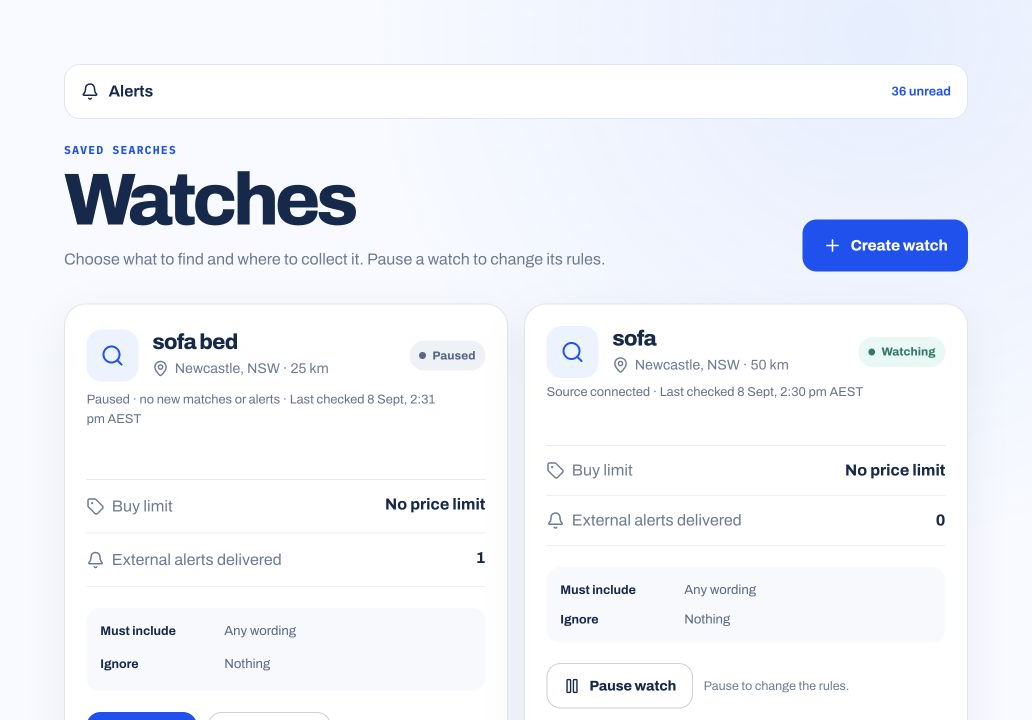
A search watch saves what you want to find, where to look and which words to include or exclude.
Set up a search
- Open Watches in First Flip and choose Create watch.
- Enter the item, area and travel radius.
- Add words to include or exclude if you need to narrow the results.
- Leave the buy limit blank to include relevant listings at any price, or enter a limit to filter by asking price.
- Save the watch, then check its status.
You do not need an expected resale value to create a watch. The optional buy limit filters listings; it is not a valuation.
Check whether the watch is running
- Saved · Off
- Your criteria are saved, but the watch is not running.
- Paused
- The watch keeps its criteria while collection and new alerts are paused.
- Watching
- The watch is active. Check its source status and last-check time for freshness.
- Waiting for a source connection check
- The source has not yet been confirmed. You may not receive fresh results.
Refine the results
If too many unrelated items appear, make the item description more specific or adjust the word filters. If few items appear, check the area, radius and source status before broadening the search.
For a single listing you want to follow, use a listing price watch. It follows that item rather than searching for new ones.